
Review updated: October 2026
Evidence level: Long-Term Tested
My verdict: BUY IF you’re actively sourcing products for Amazon wholesale or online arbitrage.
I’ve used Seller Assistant for several years, and it has become one of the tools I rely on most when researching Amazon FBA products.
The reason is pretty simple.
When I’m looking at a product, I don’t just need its sales rank.
I need to know whether I can sell it, how many sellers are competing, whether Amazon is on the listing, what the Buy Box is doing, estimated sales, historical pricing, possible IP problems, FBA fees, profit, ROI, and how much I can afford to pay for the product.
Seller Assistant puts most of that information directly in front of me.
That doesn’t mean the tool magically tells you which product to buy. It doesn’t.
You still have to understand the data and make the decision yourself.
But for the type of Amazon FBA research I do, Seller Assistant removes a lot of the manual work.
Affiliate disclosure: I am a Seller Assistant affiliate. If you purchase through my links, I may earn a commission. I have also been using Seller Assistant for several years in my own Amazon FBA product research. My recommendation comes from that experience, not from the commission. I’ll also explain the limitations I think you should know before paying for it.
Seller Assistant Review: What You’ll Learn From My Years of Using It
In this Seller Assistant review, I’ll show you how I’ve been using the tool for Amazon FBA product research, what features I actually rely on, where it saves me time, and where you still need to use your own judgment.
You’ll see how I use Seller Assistant for product analysis, historical price and BSR data, storefront research, profitability checks, selling restrictions, and IP risk alerts. I’ll also explain the drawbacks, pricing, who I think it’s best for, and whether I believe it’s worth paying for as an Amazon seller.
What Is Seller Assistant?
Seller Assistant is a product research and sourcing platform built mainly for Amazon sellers.
Its browser extension appears directly on Amazon product pages, search results, and seller storefronts. The platform has expanded considerably beyond the extension and now includes tools for analyzing supplier price lists, checking restrictions in bulk, researching brands and sellers, finding suppliers, repricing, purchase-order management, listing products, and other parts of a wholesale workflow.
For me, though, the extension is still one of the most useful parts because it gives me information while I’m actually researching a product on Amazon.
I don’t have to copy an ASIN, open five other websites, calculate everything manually, and then return to Amazon.
The information is right there.
What I Actually Use Seller Assistant For
Let me show you why I find it useful instead of just giving you a list of features.
1. I Can Analyze a Product Without Leaving the Amazon Listing
This is probably where I spend the most time.
Seller Assistant adds a research panel directly to an Amazon listing.
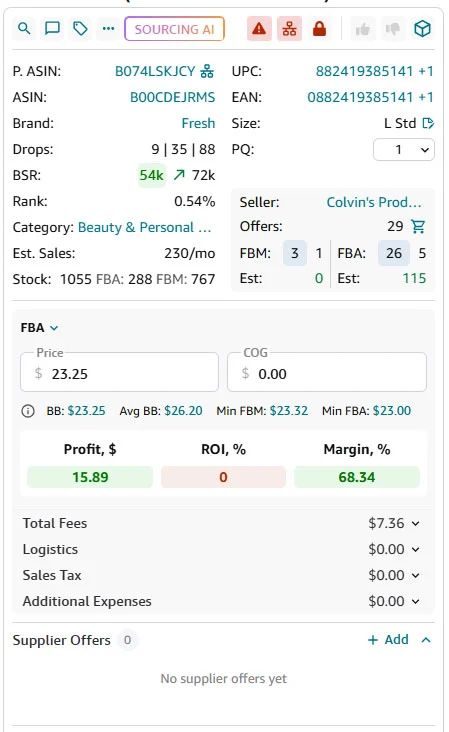
Seller Assistant showing product data, sellers, estimated sales, FBA/FBM offers, profitability calculations, fees, and product identifiers directly on an Amazon listing.
In the screenshot above, I can immediately see things such as:
- ASIN
- UPC/EAN
- brand
- package quantity
- BSR
- category
- estimated monthly sales
- number of offers
- FBA and FBM seller counts
- current seller
- Buy Box information
- fees
- profit
- ROI
- margin
That’s the type of information I actually need when deciding whether a product deserves further research.
Seller Assistant also lets you configure shipping, prep, logistics, taxes, and other costs that feed into its profitability calculations. Seller Assistant
One important warning about the calculator
Look closely at my screenshot.
The COG is $0.00.
Because I haven’t entered my actual cost of goods yet, the calculator cannot give me a meaningful ROI figure.
That’s important.
A tool can calculate numbers for you, but the result is only as good as the information you give it.
Before I decide whether a product is profitable, I enter:
- my supplier cost
- shipping
- prep
- inbound expenses
- any additional costs
Then I look at the result.
Don’t see a green profit number and automatically assume you’ve found a good product.
2. I Use the Historical Chart Before Trusting Today’s Price
A product can look fantastic today and terrible when you look at the last six months.
That’s why I don’t like making sourcing decisions from a single snapshot.
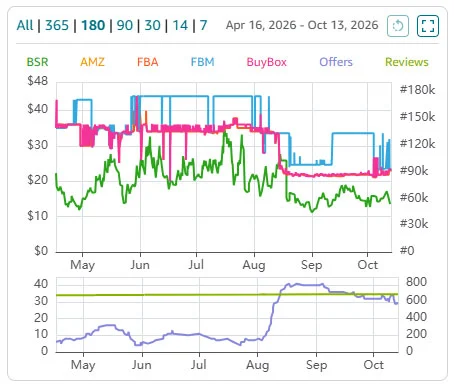
The historical chart helps me compare Buy Box, Amazon, FBA/FBM prices, BSR, offer count, and review history instead of judging a product from today’s numbers alone.
Seller Assistant’s chart can show historical information including:
- Buy Box price
- FBA price
- FBM price
- Amazon price
- BSR
- number of offers
- reviews
and lets you change the time period you’re analyzing.
This matters a lot. Suppose the Buy Box is $35 today. That looks good.
But then I look at the chart and see it spent most of the previous three months around $22.
Now I have a very different product.
Or maybe Amazon disappeared from the listing two weeks ago, which is why third-party sellers suddenly have the Buy Box.
Again, that’s different from finding a listing where Amazon hasn’t been competing for months.
The chart helps me ask:
Is today’s situation normal, or am I looking at a temporary opportunity?
That’s one of the questions I care about most before buying inventory.
3. The Storefront Widget Saves Me a Huge Amount of Research Time
This is another Seller Assistant feature I use for product discovery.
When I find an Amazon seller that appears to be selling the type of products I’m interested in, I can analyze the seller’s storefront.
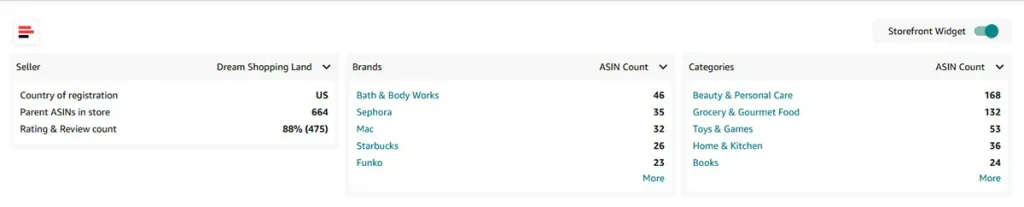
Seller Assistant’s Storefront Widget showing a seller’s registration country, number of parent ASINs, major brands, categories, and ASIN counts.
In this example, Seller Assistant shows me:
- seller country
- number of parent ASINs
- seller rating/reviews
- major brands
- number of ASINs from each brand
- main product categories
The official documentation confirms that the Storefront Widget is designed to surface these seller, brand, and category details directly on the storefront.
Why do I care?
Because storefront research is one of the ways I find potential brands and products.
If I find a seller carrying hundreds of products from brands that fit my sourcing model, I don’t want to open all 600 listings manually.
I want to know:
- What brands is this seller heavily invested in?
- Which categories dominate the store?
- Which products actually have meaningful sales?
- Seller Assistant makes that process much faster.
4. I Can Scan Products Inside a Storefront Instead of Opening Them One by One
The storefront analysis gets even more useful when I move down to individual products.
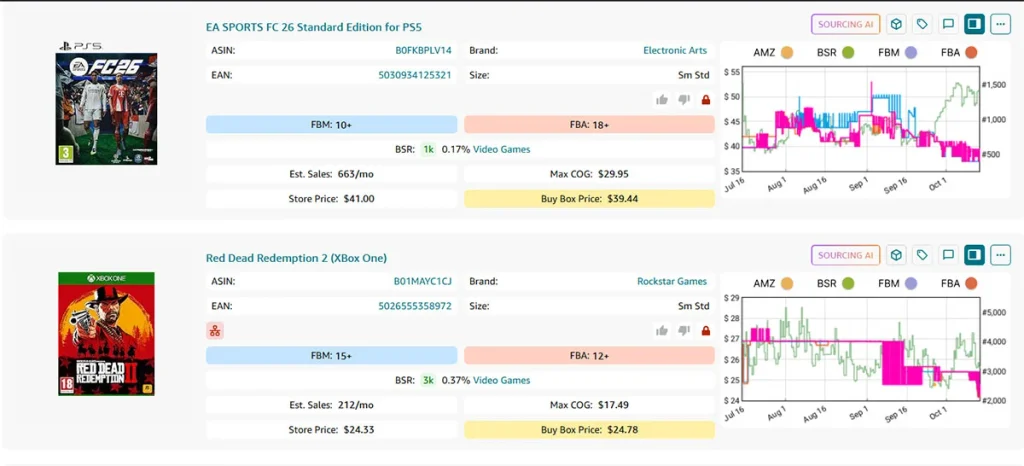
Suggested caption: Storefront product analysis showing estimated sales, Buy Box price, seller counts, BSR, Max COG, and historical pricing for individual listings.
Here I can see data such as:
- product title
- ASIN
- brand
- UPC/EAN
- FBA sellers
- FBM sellers
- BSR
- estimated monthly sales
- Buy Box price
- store price
- Max COG
- historical chart
without opening every product individually.
Seller Assistant’s current Storefront Widget documentation lists these same data points, including estimated sales, seller counts, BSR, Max COG, Store Price, Buy Box Price, product alerts, and historical chart access.
This is particularly useful when I’m doing reverse sourcing.
Instead of starting with a supplier and asking: What can I sell?
I can start with successful Amazon sellers and ask: What are they selling that might also fit my sourcing criteria?
It doesn’t mean I’m automatically going to copy everything another seller carries. Far from it. But it gives me leads. And good product research starts with finding good leads.
5. IP Alert Is One of the Features I Pay Serious Attention To
Profit doesn’t matter much if the product creates an account-health problem.
That’s why the IP Alert feature is important to me.
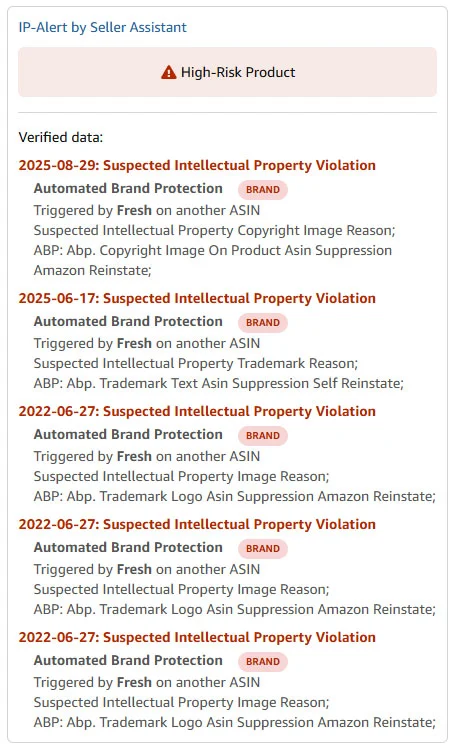
Seller Assistant IP Alert showing historical intellectual-property complaints associated with a brand. I use this as a risk warning, not proof that every ASIN from the brand will generate a complaint.
The example above is exactly the kind of information I want to know before buying inventory.
Seller Assistant’s IP Alert database shows known intellectual-property complaints reported from Amazon seller accounts, including the complaint type and available details.
But there’s an important distinction here.
Look at my screenshot carefully.
It says the complaints were:
Triggered by Fresh on another ASIN
That does not mean the exact ASIN I’m looking at has definitely generated an IP complaint.
It tells me the brand has relevant complaint history in Seller Assistant’s database.
That’s a warning. Not a conviction.
If I see multiple IP complaints from the same brand, I don’t immediately say: “This product is impossible to sell.”
I say: “I need to investigate this brand much more carefully before I spend money.”
For me, that’s exactly what a risk tool should do.
Selling Restrictions Matter Too
Seller Assistant can connect to your Amazon Seller account and show restrictions that are specific to your account.
That is useful because two sellers may not have exactly the same eligibility.
When your Amazon seller account is connected, Seller Assistant can display account-specific restriction information and use its Bulk Restriction Checker.
That’s especially useful when you’re checking a large number of ASINs.
I don’t want to spend hours finding a profitable product only to discover later that my account cannot sell it.
And in my case, Needs Approval isn’t automatically a rejection.
Sometimes getting brand authorization or the necessary documentation is part of the strategy.
The tool gives me information. I decide what to do with it.
Seller Assistant Does More Than What You See in My Screenshots
The screenshots above show the parts of Seller Assistant that are particularly useful in my research workflow.
The current platform also includes tools such as:
- Price List Analyzer
- Bulk Restriction Checker
- AI Supplier Finder
- Seller Spy
- Brand Analyzer
- Repricer
- Purchase Orders
- Amazon Lister
- inventory/workflow tools
- Google Sheets integration
- API and automation integrations on eligible plans
Seller Assistant now describes itself as a broader sourcing and workflow platform rather than just an Amazon browser extension.
I wouldn’t tell you that I’ve personally tested every feature simply because it exists. I haven’t.
My recommendation is mainly based on the product-research functionality I’ve actually relied on over the years.
What I Like Most About Seller Assistant
1. Puts the information about where I need it
This sounds simple, but it’s probably the biggest advantage.I’m already on Amazon researching the listing.
Seller Assistant puts the analysis on Amazon. That saves me from constantly jumping between tabs and tools.
2. Helps me eliminate bad products faster
Product research isn’t only about finding winners. A huge part of the work is rejecting products quickly.
If I see:
- Amazon dominating the listing
- unstable pricing
- too many sellers
- weak sales
- poor margins
- selling restrictions
- concerning IP history
I can move on. Sometimes the biggest value of a research tool is the inventory it prevents you from buying.
3. Storefront research is genuinely useful
I like being able to move from: seller → brands → products → individual ASIN analysis without rebuilding the research manually at each stage.
For wholesale product research, that workflow makes sense to me.
4. The IP data adds a layer I don’t want to ignore
I would rather know that a brand has complaint history before I place an order.
It doesn’t answer every legal or account-health question.
But it gives me information I wouldn’t want to research without.
What Seller Assistant Doesn’t Do for You
This is where I think it’s important to separate good software from good sourcing decisions.
Seller Assistant can give you a lot of data, but it cannot replace your judgment.
1. Sales estimates are still estimates
If Seller Assistant says a product sells 230 units per month, I do not interpret that as: Exactly 230 units will sell this month. It is an estimate.
I use it as one piece of evidence alongside BSR history, pricing, seller count, Buy Box behavior, reviews, and other signals.
2. It doesn’t tell you whether a supplier is legitimate
Finding an offer isn’t the same as finding an authorized supplier.
You still need to investigate:
- who the supplier is
- whether they are authorized
- whether the invoice will meet Amazon’s requirements
- whether the brand permits marketplace sales
- whether you can obtain authorization if required
Seller Assistant can help with supplier discovery.
It doesn’t remove your due diligence.
3. An IP Alert doesn’t automatically mean “never sell”
I mentioned this earlier because it’s worth repeating. An IP warning tells me to investigate.
It doesn’t automatically tell me what the final decision should be. You need context.
Is the complaint associated with:
- the exact ASIN?
- another ASIN from the brand?
- trademark?
- copyright?
- counterfeit complaints?
- something historical that may no longer reflect current policy?
The screenshot I supplied is a good example of why reading the details matters.
4. The calculator doesn’t know your real cost unless you enter it
Again, my own screenshot demonstrates this perfectly.
COG = $0.00.
Until I enter the actual supplier price and relevant expenses, ROI isn’t meaningful.
The software calculates. You supply the assumptions.
Seller Assistant Pricing
Seller Assistant isn’t free if you want its full functionality.
As of October 2026, the official monthly pricing is approximately:
| Plan | Monthly price | Best fit |
| Pro | $29.99/month | Individual/growing sellers |
| Business | $79.99/month | Wholesale teams and heavier workflows |
| Business Plus | $189.99/month | Larger wholesale operations |
Annual billing currently reduces the effective monthly cost, and Seller Assistant offers a 14-day trial. The exact feature limits differ between plans, so check the current pricing page before subscribing.
There is also a limited free level after the trial, but many of the features that make Seller Assistant valuable are restricted there.
Is $29.99 per month expensive?
If you’re only thinking about starting Amazon someday, maybe.
I wouldn’t subscribe to a stack of research tools before I was actually doing research.
But if you’re regularly evaluating products and making inventory decisions worth hundreds or thousands of dollars, I look at the price differently.
One bad inventory purchase can cost more than months of software.
For me, the value comes from:
- saving research time
- identifying risks earlier
- calculating profitability
- avoiding products that don’t fit
- finding additional sourcing leads
That’s why I’ve continued using it.
Who I Think Seller Assistant Is Best For
I’d particularly consider it if you’re doing: Amazon wholesale or online arbitrage and product sourcing is a regular part of your business.
It’s especially useful if you routinely analyze:
- many ASINs
- seller storefronts
- brands
- supplier lists
- Buy Box behavior
- account restrictions
- profitability
- IP risk
The more research you do, the easier it becomes to justify having the information centralized.
Who Probably Doesn’t Need It Yet
I wouldn’t tell every Amazon seller to subscribe immediately.
If you’re:
- just learning what Amazon FBA is
- researching only a few products per month
- not actively buying inventory
- doing primarily private label
- looking for a tool that will simply tell you “buy this product”
You may not need the full platform yet. Seller Assistant gives you information. It doesn’t eliminate the work. And it definitely doesn’t guarantee that a product will be profitable.
What the Sales Page Can’t Decide for You
This is the biggest point I’d make after using Seller Assistant for years.
You can have excellent software and still make terrible product decisions.
A green ROI number doesn’t know:
- whether your supplier is authorized
- whether the brand wants you on Amazon
- whether the Buy Box is about to collapse
- whether Amazon will return to the listing
- whether you can actually win enough sales
- whether your authorization documents will be accepted
- whether a temporary price spike is making the deal look better than it really is
Seller Assistant helps me answer many of the data questions. I still have to answer the business questions. That’s not a weakness specific to Seller Assistant.
That’s how Amazon product research works.
Are you planning to create a blog and need a reliable hosting? Check out Exonhost.
My Verdict: Is Seller Assistant Worth It?
For me, yes.
I’ve used Seller Assistant for several years because it gives me the information I repeatedly need while researching Amazon products.
I can look at a listing and quickly evaluate:
- Demand.
- Competition.
- Buy Box.
- Amazon presence.
- Seller count.
- Profit.
- ROI.
- Restrictions.
- IP risk.
- Historical behavior.
Then I can move into storefronts, brands, supplier research, or deeper analysis without starting from scratch. That’s why it has stayed in my workflow.
Would I tell you to blindly subscribe because I use it?
No.
If you’re barely researching products, the subscription may not make sense yet.
But if you’re actively sourcing for Amazon wholesale or online arbitrage and regularly making inventory decisions, Seller Assistant is one of the tools I would seriously consider.
My recommendation is:
BUY IF you’re actively sourcing Amazon products and want the research, profitability, risk, and storefront information in one place.
But use the software as a decision-support tool. Not as a replacement for judgment.
Frequently Asked Questions
Is Seller Assistant good for Amazon FBA product research?
I think so. That’s primarily why I’ve continued using it. It gives me product, seller, profitability, restriction, historical pricing, and risk information directly inside my Amazon research workflow.
Does Seller Assistant tell me whether I can sell a product?
When you connect your Amazon Seller account, Seller Assistant can show account-specific restriction information and supports bulk restriction checks.
That doesn’t necessarily mean every restricted product should be abandoned. Sometimes approval or authorization may still be possible.
Are Seller Assistant sales estimates exact?
I don’t treat them as exact.
They’re useful estimates that I combine with BSR history, price history, competition, seller count, and other information before making a decision.
Does Seller Assistant show IP complaints?
Yes. Its IP Alert feature surfaces known complaint history from its database.
I treat an alert as a risk signal that needs investigation, not automatic proof that the exact product will cause an IP complaint.
Can I analyze other Amazon sellers’ storefronts?
Yes. The Storefront Widget shows seller information, major brands, categories, ASIN counts, and product-level research data.
This is one of the features I find especially useful for reverse product research.
Is Seller Assistant free?
There is currently limited free access, while the full research and workflow features are available through paid plans.