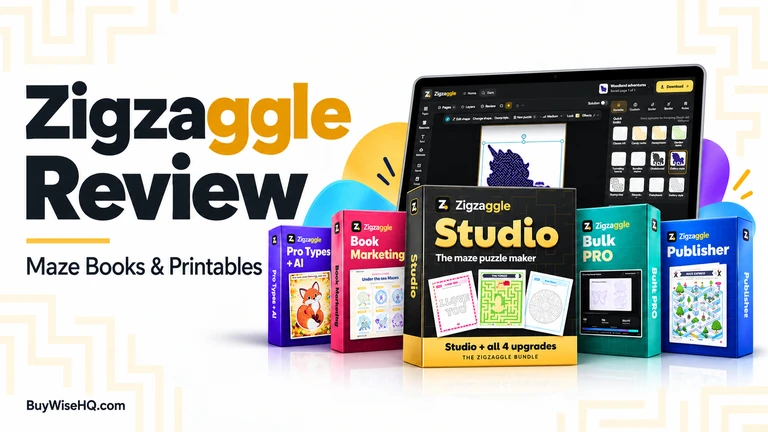
My verdict: Zigzaggle is worth considering if you have a specific use for maze books or printable activities. I would start with the basic Studio and make one small product before buying upgrades.
What interests me is the practical job it promises to handle: creating puzzles, their solutions, and printable layouts together. That could save useful production time.
What would not convince me is the idea that making more books automatically means selling more books. You still need an audience, a worthwhile product, and a reason for someone to choose yours.
Affiliate disclosure: This review may contain affiliate links. If you purchase through them, BuyWiseHQ may earn a commission at no additional cost to you.
Review transparency: This is a research-based review of the official product pages, upgrade details, license, and policies. I have not tested the paid software, published its output, or measured sales results.
Zigzaggle Review: At a Glance
| Detail | What you need to know |
| Product | Zigzaggle Studio |
| Vendor | Kevin Huynh |
| Purpose | Creating maze puzzles, printable activities, and maze books |
| Advertised starting price | $27 during launch; $47 afterward |
| Payment | One-time payment for Studio; optional paid upgrades |
| Commercial use | Included, subject to the license |
| Refund window | Advertised 14 days |
| Best fit | Printable sellers, activity-book creators, and educators who need custom materials |
| The Official Page | >> Click here to Access |
Prices and offer details were checked on October 25, 2026. The official funnel separates Studio from five optional upgrades; the complete package costs substantially more than the starting price.
What Exactly Is Zigzaggle?
Zigzaggle is a browser-based maze design application. You use it to create puzzle pages, customize their appearance, and prepare downloadable files.
The base Studio advertises more than 25 maze types, including shape, word, picture, and educational variations. It also includes an editor, artwork, answer keys, and PDF, PNG, and SVG exports.
Think of it as a specialized production tool for activity content.
A possible finished product could be a dinosaur maze pack, a personalized birthday activity, or a themed workbook. Those are examples of how I would approach the tool—not products whose sales I have verified.
What Does Zigzaggle Actually Do?
Its appeal is bringing three jobs together:
- Generating the puzzle.
- Designing the surrounding page.
- Preparing the puzzle and its answer for printing.
Studio also advertises photo-to-maze tracing without AI credits, cover creation, and page-by-page book assembly with a limit of 60 interior pages.
That last detail matters. The basic product can assemble books, but the more automated, higher-volume workflow belongs to an upgrade.
For me, the useful question is not “How many maze styles are included?” It is “Can this help me make a better activity pack with less repetitive work?”
How Does It Work?
The advertised workflow is straightforward:
- Choose a maze type or starting design.
- Adjust the puzzle, difficulty, and appearance.
- Add instructions and other page elements.
- Review the puzzle and answer.
- Export the finished files.
The vendor says the software checks puzzles before printing and provides book-related checks for matters such as page requirements and bleed. These are advertised capabilities, not performance I have independently tested.
My additional step would be to print a sample at its intended size.
A page can look attractive on a monitor and still have cramped paths, faint lines, or instructions that confuse its intended reader. For children’s activities, I would also ask someone in the target age group to try it.
Is the $27 Version Enough?
For a small, deliberately designed printable pack, the base version looks like a reasonable starting point. For automated book production, budget differently.
Bulk PRO advertises whole-book creation, batches of up to 60 new pages, and books containing up to 200 mazes. It also adds multi-puzzle layouts and higher storage limits. Its listed price is $77, making Studio plus Bulk PRO $104 at launch.
I would decide between them based on the work I expect to do.
If I wanted ten carefully selected activities for a classroom pack, generating hundreds of pages would not be my priority. If I already sold puzzle books and spent hours assembling interiors, bulk creation would deserve closer attention.
There is another important distinction: the advertised 95-plus maze types are spread across the product range.
Publisher explicitly says it does not include Pro Types + AI, Book Marketing Studio, or Bulk PRO. Buying the most expensive upgrade does not unlock everything else.
That makes “buy all the features” a poor default buying strategy. I would identify the missing capability first.
Does Zigzaggle Require AI Credits?
The basic maze workflow does not require buying AI credits. Optional AI picture generation is part of Pro Types + AI.
That $47 upgrade includes 500 credits. The vendor lists two credits for an AI picture maze or seven for a maze with a matching scene. Therefore, the allocation represents up to 250 basic picture mazes, or 71 with matching scenes, assuming you spend nothing on other AI functions.
I would treat AI artwork as an optional production expense.
It could help when you need a particular illustration. But a clear, enjoyable puzzle does not become more valuable merely because AI generated its decoration. I could not verify current credit top-up prices, so I would check those before planning an AI-heavy product range.
What I Like—and What Gives Me Pause
These are my assessments of the documented offer, rather than hands-on findings.
What I like:
It addresses a specific production task. A focused maze tool is easier to evaluate than a vague promise to automate an entire business.
The base offer has a plausible standalone use. I can see a sensible reason to buy it for a modest printable project without immediately purchasing every upgrade.
The product range separates different needs. More puzzle types, bulk production, and marketing assets solve different problems. That gives a disciplined buyer room to choose.
What gives me pause:
The attractive demonstrations may involve different purchase levels. I would check which tier creates a particular example before assuming it comes with Studio.
More output can create more editing work. Producing a large book quickly is only helpful if its puzzles, instructions, and difficulty remain consistent.
Access depends on the service continuing. The terms define one-time access as lasting while Zigzaggle operates. Club Lifetime likewise refers to the product’s lifetime. I would keep local copies of finished exports.
Sales Claims vs. What They Mean for You
| Selling point | My interpretation |
| Checked, solvable puzzles | Useful if dependable, but a valid route does not establish age suitability or enjoyment. |
| Print-ready output | A starting point for proofing; I would still inspect the exported file and a physical sample. |
| Whole books in one click | A production shortcut, not evidence that the resulting book has a market. |
| Commercial rights | Permission to sell eligible output, not guaranteed marketplace approval or exclusive artwork. |
| Marketplace success examples | Evidence that some products find buyers, not a forecast for your own listing. |
The distinction I care about is tool value versus business value.
Zigzaggle may reduce the effort required to produce content. Whether that content deserves a buyer’s money depends on the choices you make around it.
Zigzaggle Pricing and Upgrades
These are the advertised prices checked on October 25, 2026:
| Product | Price | Main purpose |
| Studio | $27 launch; then $47 | Core maze creation and editing |
| Pro Types + AI | $47 once | Additional types and AI tools |
| Book Marketing Studio | $67 once | Promotional images, videos, and listing assets |
| Bulk PRO | $77 once | Bulk pages and automated book creation |
| Publisher | $197 once | Additional puzzle formats and publishing features |
| Club | $27/month or $127 lifetime | Recurring design releases |
Studio plus all four one-time upgrades and Club Lifetime totals $542 at launch, before any applicable taxes or extra spending. These prices come from the official affiliate offer breakdown.
My buying order would be simple: start with Studio, make something useful, and upgrade only when a specific limitation gets in the way.
The wider project budget may also include proof copies, marketplace charges, advertising, and your time. Those costs depend on where and how you sell.
Refunds and Subscription Details
The published policy offers refunds within 14 days. Refunding Studio also closes and refunds upgrades bought on the same order; refunding an individual upgrade removes that upgrade.
Club buyers should note that purchasing Lifetime does not automatically cancel an existing monthly subscription. A refund also ends the license associated with the refunded product.
I have verified the written policy, not the speed or quality of refund handling.
Can You Sell What You Make?
The published license permits selling finished books, printables, and activity pages, including work made for clients.
It does not permit reselling the software, sharing your account, or redistributing its art library and ready-made pages as they are. It also warns against assuming AI pictures are exclusive.
My practical advice is to create a coherent finished product with a clear audience, your own selection of activities, and useful instructions. Commercial permission is a foundation; the finished product still needs care.
For Amazon KDP, two details are worth knowing:
- Puzzle books are generally not categorized as low-content books, although exceptions exist.
- KDP requires disclosure of AI-generated text or images, including interior and cover artwork. Its policy distinguishes this from AI-assisted work.
If you use the optional AI artwork, check the applicable disclosure requirements when publishing.
Where Could Zigzaggle Create Real Value?
I would begin with a narrow problem.
“Maze books for everyone” gives me little direction. “A printable activity pack for a rainy-day dinosaur party” tells me much more about the theme, difficulty, instructions, and presentation.
Other possible uses include personalized activities, supplementary classroom materials, or a small pack for an existing shop’s customers.
These are ideas to validate, not proven opportunities.
Before building a large collection, I would ask:
- Who will use this?
- Why would they choose it over an existing activity?
- Can I reach those buyers?
- Does the finished product justify its price?
A useful way to assess the purchase is to compare its cost with the time it could save on a project you already intend to complete. That is more grounded than assuming a certain number of future sales.
What Are the Alternatives?
1. Zigzaggle’s free maze generator
For occasional personal or classroom activities, start here. It offers printable mazes with answers, but its stated use is personal and classroom use rather than commercial resale.
For a teacher who needs a few simple worksheets, paying for the full Studio may be unnecessary.
2. MazeGenerator.net
This is another option for generating mazes, with a separate commercial licensing arrangement.
Its published prices include individual licenses from SEK 49 per maze with attribution, and annual unlimited licenses from SEK 1,025 with attribution, excluding applicable VAT. Without-attribution licenses cost more.
It is worth comparing for straightforward maze needs, although I would not assume it replaces Zigzaggle’s full editing and book workflow.
3. Commission a small custom activity pack
If you need one distinctive product and have no interest in learning another application, commissioning a designer is another route.
There is no universal price comparison here. I would request a quote covering puzzle checking, print files, revisions, and commercial rights, then compare the whole project cost.
Sometimes the better purchase is a finished result.
Who Should Buy Zigzaggle—and Who Should Skip It?
Consider it if you:
- Have a defined printable or activity-book project.
- Want to create custom puzzle content regularly.
- Are willing to review and improve the output.
- Can start with a small purchase and resist unnecessary upgrades.
Skip it for now if you:
- Only need occasional basic worksheets.
- Expect the software to provide customers.
- Have no time to proofread or test activities.
- Are buying mainly because the demonstrations make publishing look effortless.
What Remains Unverified?
The public documentation provides a relatively clear basis for comparing prices, purchase levels, and license terms.
It does not let me confirm day-to-day reliability, actual editing speed, export quality across every puzzle type, support responsiveness, or typical buyer earnings.
That is why I am not assigning a numerical score for performance or ease of use. Those deserve direct testing.
Are you interested in Pinterest campaign for Amazon Affiliate? Try Pin2Profit.
My Final Verdict: Would I Buy Zigzaggle?
Yes, potentially—but I would buy the basic Studio for a defined project, not the full package on speculation.
I can see practical value in a tool that brings puzzle creation and page preparation together. The strongest case is saving work you already need to do.
My first project would be a small, themed activity pack. I would print it, check every answer, and watch someone use it. Only then would I decide whether bulk production or additional puzzle types were worth paying for.
If your real problem is finding customers or choosing a worthwhile product, solve that alongside the software purchase. Faster production alone will not answer those questions.
Frequently Asked Questions
Is Zigzaggle a one-time purchase?
Studio is advertised as a one-time purchase. Club has an optional monthly plan, and AI use may involve additional credit spending. One-time access remains dependent on the service operating.
Do I need the upgrades?
Not necessarily. Start with the capabilities required for your project. Bulk production, additional types, and AI tools are separate purchasing decisions.
Does Zigzaggle include all 95-plus maze types for $27?
No. The base Studio advertises 25-plus types. The larger selection spans additional upgrades.
Can I sell Zigzaggle printables?
Yes, eligible finished products are covered by the commercial license. That does not permit redistributing the software or its underlying asset library.
Is Zigzaggle suitable for beginners?
The advertised workflow appears approachable, but I have not tested its learning curve. Beginners will still need to learn product preparation and their chosen selling platform.
Can Zigzaggle guarantee income?
No. Creating a puzzle product and finding paying customers are separate tasks.
Is there a free option?
Yes. Zigzaggle offers a free generator for personal and classroom activities. Check its usage terms before using any output commercially.